© Ujjawal Solanki | All Rights Reserved



I am Ujjawal Solanki, a dedicated software developer with expertise in full-stack development, React applications, and Node.js backend services. I create innovative, scalable, and user-friendly web applications.
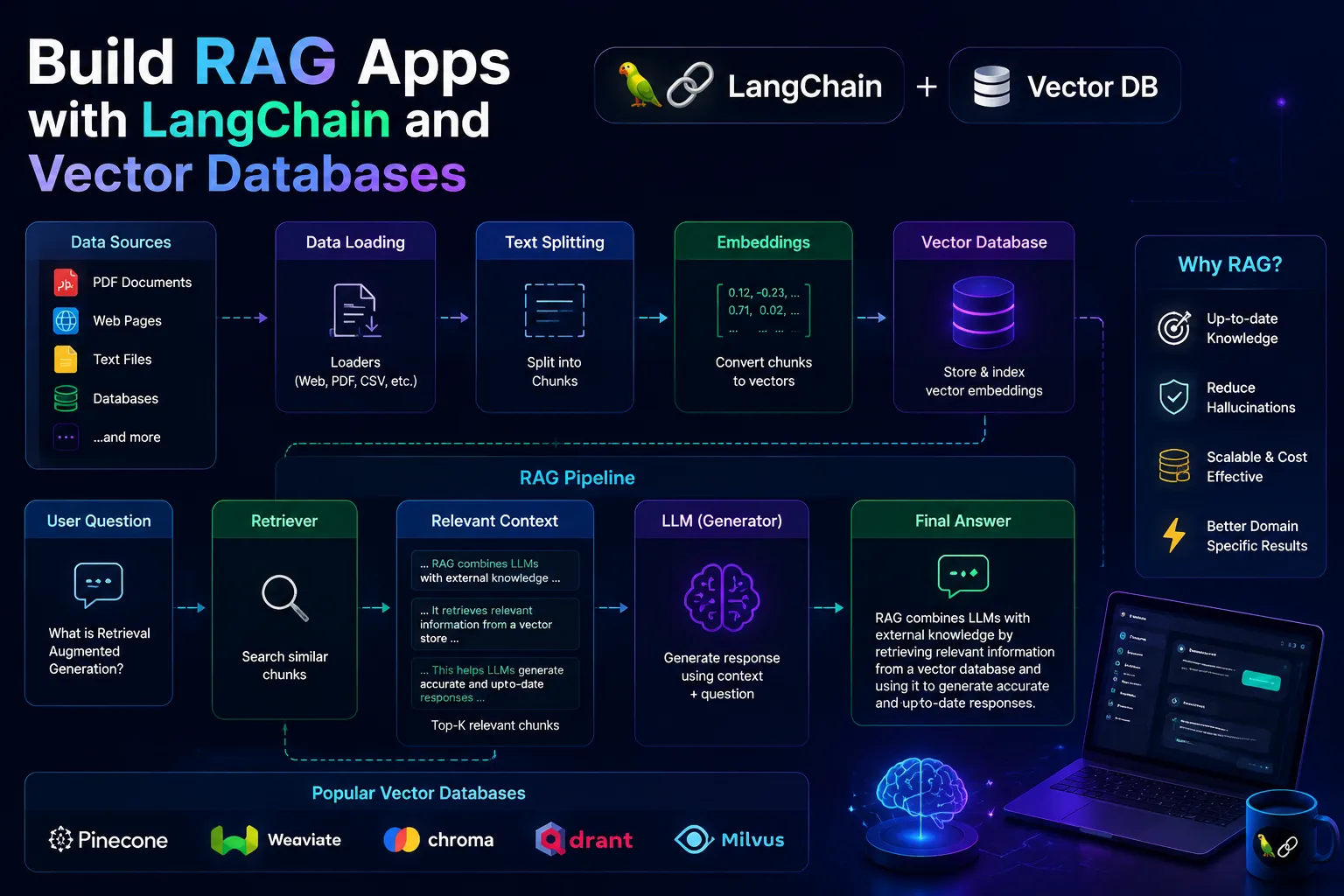
I did not get interested in RAG because I wanted to sound clever in AI conversations. I got interested because I asked a chatbot about my own notes and it answered with the confidence of a stranger making things up.
I had client docs, product notes, old architecture decisions, and onboarding guides scattered across files. The information existed. It just was not reachable in a way that felt trustworthy.
That is what pushed me toward retrieval-augmented generation. I did not need a universal genius. I needed a system that could answer from my actual material.
I thought RAG meant throwing a giant document into a prompt and hoping the model behaved. That is not retrieval. That is wishful stuffing.
Then I overcorrected by obsessing over tools before understanding the pipeline. Vector database. Embeddings. LangChain. Chunking. I knew the vocabulary before I knew the workflow.
RAG is really a search problem followed by a generation problem. If search is weak, the language model mostly writes polished nonsense.
Once I understood that sequence, RAG stopped feeling mystical. It became engineering again.
My first mistake was trying to index everything at once. That made debugging impossible because I never knew whether the failure came from retrieval quality or from messy source material.
Pick a handful of high-quality docs first. If the system cannot answer from clean material, scale only makes it worse.
This is where many beginner RAG apps quietly fall apart. If chunks are too small, they lose context. If they are too large, retrieval gets muddy and token costs climb.
I aim for chunks that feel like one idea, one subsection, or one procedural block, often with overlap to preserve continuity.
from langchain.text_splitter import RecursiveCharacterTextSplitter

splitter = RecursiveCharacterTextSplitter(
    chunk_size=900,
    chunk_overlap=150
)
chunks = splitter.split_text(document_text)Filename, section title, heading path, and update date matter more than beginners expect. Good metadata improves debugging, source display, and filtering later.
docs = [
  {
    'pageContent': chunk,
    'metadata': {
      'source': file_path,
      'title': title,
      'section': section_name
    }
  }
  for chunk in chunks
]I used to think the prompt was the star. In practice, retrieval quality matters more. Once relevant chunks are present, the prompt only needs to encourage grounded answering.
retriever = vectorstore.as_retriever(search_kwargs={'k': 4})
results = retriever.invoke(question)

prompt = f'''Answer using only the context below.
If the answer is unclear, say so.

Context:
{results}

Question:
{question}'''
This was the feature that made my prototypes feel useful instead of magical. People trust answers more when they can inspect the exact note or document section behind them.
It also helps you catch retrieval bugs faster because the wrong source is a visible clue.
If a chunk mixes unrelated topics, retrieval may return text that is technically similar but practically unhelpful.
The model cannot retrieve clarity from docs that are outdated, contradictory, or half-finished. Garbage in still matters.
Sometimes the best answer needs several nearby chunks. Returning only one result can make the system sound incomplete.
If your RAG app sounds smart but vague, inspect retrieval results before changing models. The model is often getting poor evidence.
It did not turn my app into some mythical AI assistant. It turned my own messy knowledge base into something searchable in plain English. That is a much more grounded and useful outcome.
For internal docs, onboarding, client knowledge, support playbooks, or project history, that shift is huge.
If this helped you, save it for later. And if you are stuck on a MERN feature, you can always reach out to me.
© Ujjawal Solanki | All Rights Reserved