© Ujjawal Solanki | All Rights Reserved



I am Ujjawal Solanki, a dedicated software developer with expertise in full-stack development, React applications, and Node.js backend services. I create innovative, scalable, and user-friendly web applications.
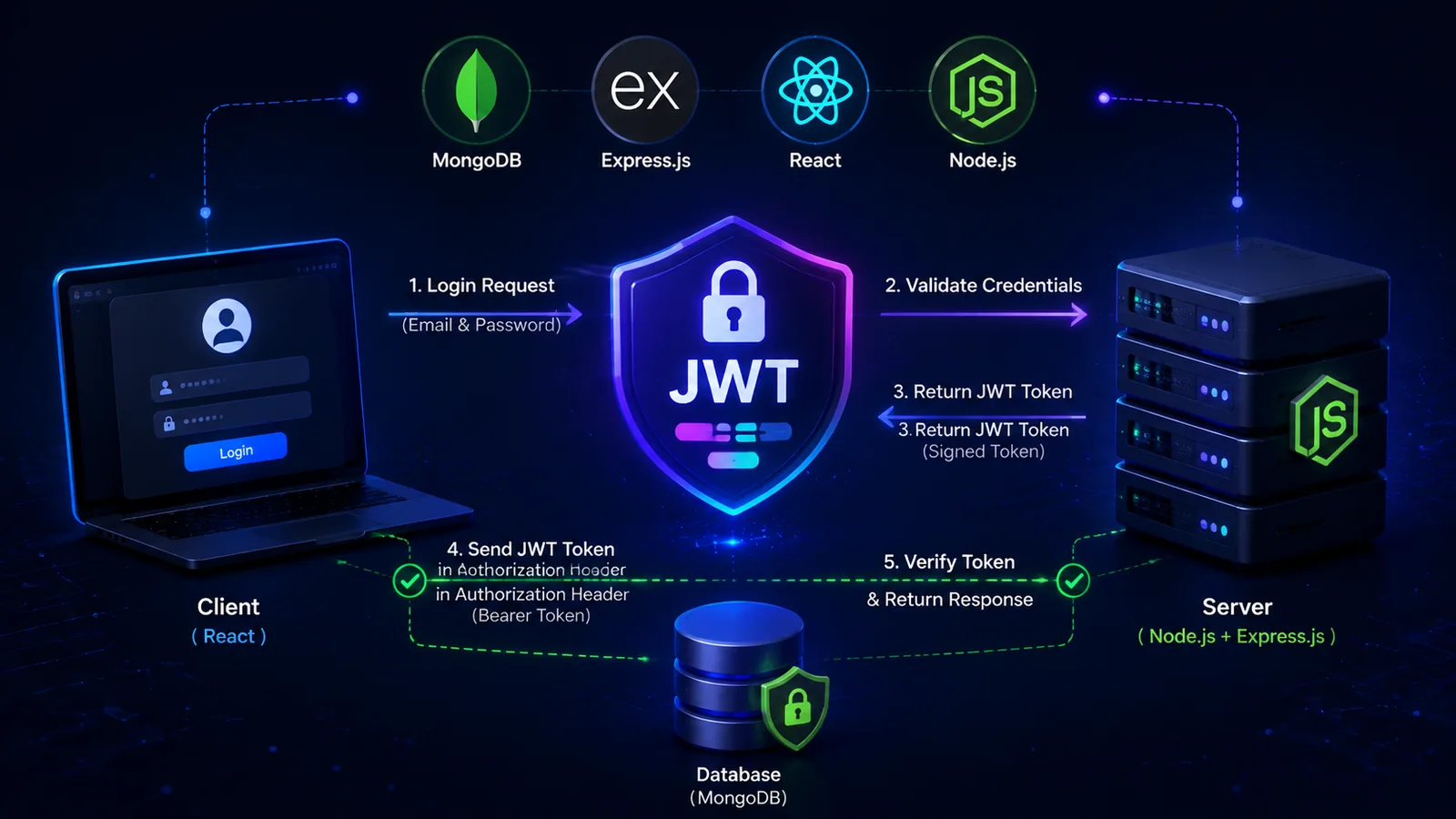
My first login system was the kind of thing that works in a demo and embarrasses you later. A form posted email and password, the server returned a user object, and I convinced myself the app had authentication.
It did not. It had optimism. That is different.
The real shock came when I opened the app in another browser, lost my session, and realized I did not understand what should persist, what should be verified, or what should never be stored in the first place.
Authentication touches almost every layer at once. The database must store users safely. The API must issue and verify credentials. The frontend must know when a user is logged in, logged out, or expired.
That is why copy-pasting a JWT tutorial often creates more confusion. You get code that runs without really getting the contract behind it.
A login form is only the front door. Authentication is the full system that decides who gets in, how long they stay in, and what they are allowed to do.
I stopped treating JWT as a mysterious security trick and started seeing it as a signed pass. The server checks identity, stamps a pass, and the client presents that pass when asking for protected resources.
The token is not magic. It is just data the server can trust because the server signed it.
This sounds obvious, but I once spent hours debating token storage while still saving passwords in the most careless way possible.
Start with a clean user schema and hash passwords before saving. If the user model is weak, the rest of the auth flow becomes theater.
const userSchema = new mongoose.Schema({
  name: { type: String, required: true },
  email: { type: String, required: true, unique: true, lowercase: true },
  passwordHash: { type: String, required: true },
  role: { type: String, default: 'user' }
}, { timestamps: true });
const passwordHash = await bcrypt.hash(password, 12);
const user = await User.create({ name, email, passwordHash });When the user logs in, compare the submitted password with the stored hash. If it matches, create a small token payload. Do not cram the whole user object into it.
Short payloads are easier to reason about and safer to expose if you ever inspect them in development.
const valid = await bcrypt.compare(password, user.passwordHash);
if (!valid) {
  return res.status(401).json({ message: 'Invalid credentials' });
}

const token = jwt.sign(
  { sub: user._id.toString(), role: user.role },
  process.env.JWT_SECRET,
  { expiresIn: '15m' }
);I used to verify tokens inside each controller. That worked until one route forgot the check and quietly became public.
A small middleware keeps the rule in one place and makes your private routes obvious.
function requireAuth(req, res, next) {
  const header = req.headers.authorization || '';
  const token = header.startsWith('Bearer ') ? header.slice(7) : null;

  if (!token) {
    return res.status(401).json({ message: 'Unauthorized' });
  }

  try {
    req.user = jwt.verify(token, process.env.JWT_SECRET);
    next();
  } catch {
    return res.status(401).json({ message: 'Invalid or expired token' });
  }
}
router.get('/profile', requireAuth, getProfile);I do not try to make auth clever anymore. On successful login, I store the minimum data I need for the current session and attach the token to protected API calls.
When the API returns `401`, I treat that as a real auth state change. The app should log the user out or refresh the session intentionally, not leave them in a confusing half-logged-in state.
const res = await fetch('/api/auth/login', {
  method: 'POST',
  headers: { 'Content-Type': 'application/json' },
  body: JSON.stringify({ email, password })
});

const data = await res.json();
setAuth({ token: data.token, user: data.user });For small learning projects, local storage is common because it is easy to understand. For production systems, httpOnly cookies often reduce XSS exposure and give you a cleaner server-controlled story.
The key is not picking the trendiest answer. It is understanding the trade-off and staying consistent.
At one point I returned the full user document after login. That included fields the frontend never needed. It was a quiet security smell hiding inside a successful response.
If your `JWT_SECRET` is obvious, your auth story is basically roleplay. Use a long, random secret and load it from environment variables in every environment.
Expired tokens are supposed to expire. The app should know how to respond. A silent 401 loop is usually a frontend state problem, not a JWT problem.
If auth keeps breaking in weird ways, inspect the full request-response cycle. Most bugs are in missing headers, token storage confusion, or state that never updates after login.
JWT became simple for me the moment I stopped trying to memorize tutorials and started tracing the user journey. Signup. Login. Request. Verify. Expire. Repeat. That is the whole story.
If this helped you, save it for later. And if you are stuck on a MERN feature, you can always reach out to me.
© Ujjawal Solanki | All Rights Reserved